
Blog • Workflow
How to Fact-Check AI-Written Content Before You Publish It
AI writes confident sentences whether or not they are true. Here is a simple process for listing every claim and checking it, with a real example.
AI is very good at sounding sure. That is the problem. A wrong date and a right date look identical on the page, and the AI will write both in the same calm voice. If you publish for clients, or under your own name, the checking is your job.
Here is the process I use, with a test I ran so you can see what it catches.
Don't ask "is this true?"
The obvious move is to paste a draft into an AI and ask whether the facts are right. I don't do that. The AI can be wrong about the very thing you are asking, and you will not know which answers to trust.
Instead, I ask it to do the part it is reliably good at: finding the claims. Then I check them myself, against real sources.
Step 1: list every claim
List every factual claim in this draft (numbers, dates, names, comparisons, "best" or "first" claims). For each, say what kind of source I would need to confirm it and how embarrassing it would be if wrong (high, medium, low). Do not tell me whether the claims are true; I will check them myself.

DRAFT: [paste]
The "do not tell me whether the claims are true" line matters. It stops the AI from reassuring you.
The test
I wrote a short draft with some deliberate traps. The second claim and the last claim are the ones I planted:
Netflix was founded in 1997 by Reed Hastings and Marc Randolph. By 2005 it had more than 30 million subscribers. Blockbuster, which had around 9,000 stores at its peak, filed for bankruptcy in 2010. Studies show that 87% of freelancers now use AI tools every day.
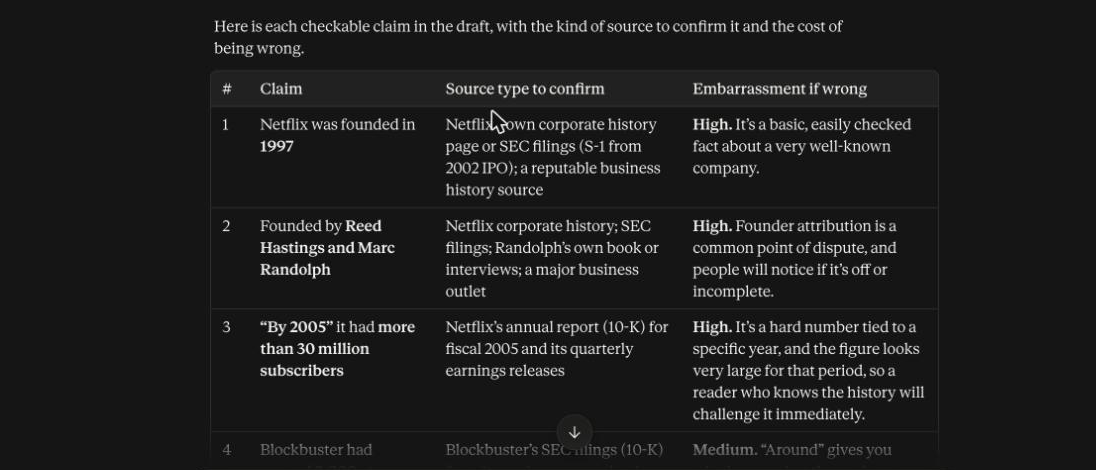
Claude broke the draft into twelve separate claims. It pointed to the right kind of source for each, such as Netflix's annual report for the subscriber number and bankruptcy court records for the date. It also noticed two things I would have missed if I had been reading quickly:
- "Studies show" is a claim by itself. If you cannot name the study, the phrase is a problem.
- "Every day" is different from "ever use". Surveys often report occasional use and drafts then overstate it.
It also said, without being asked, that the 30 million figure "looks very large for that period".
Step 2: check the claims yourself
I checked the high-risk numbers against primary sources.
- 30 million subscribers by 2005. Wrong. Netflix's fourth-quarter 2005 earnings release reports approximately 4,179,000 subscribers at the end of 2005. The draft was off by a factor of seven.
- 87% of freelancers. I made this up for the test. There is no study behind it, which is exactly how a fabricated statistic looks when an AI writes it.
I did not check the other claims for this demo. In a real post, I would.
The point is not that the AI got a number wrong. It is that the wrong number looked exactly like the right ones.
Step 3: use a sorting rule
For every claim, choose one:
- Confirmed against a source you opened. Keep it, and link the source if you can.
- Can't confirm. Cut it or soften it ("reportedly", "according to...") only if you can name who reported it.
- Wrong. Fix it.
Do the high-risk claims first: exact numbers, dates, names, quotes, and anything with "studies show", "experts say" or "most people".
Where to look
- Company numbers: annual reports and earnings releases, which are often on the company's investor page.
- Dates and events: news archives from the time, court records, official announcements.
- Statistics: the original survey or report, not an article that quotes it. Check the sample size and what the question actually asked.
- Quotes: the original recording or text. If you can't find it, don't use it.
A habit that helps
When you draft with AI, ask it to mark its own factual claims in the draft (I use [VERIFY]). It won't catch every one, as I found in an earlier test, but it gives you a head start. Then run the claim list as a second pass.
The takeaway
AI is a good assistant for finding what needs checking. It is not a good judge of what is true. Make the list with the AI, and do the checking with sources.