
Blog • Content
A Simple AI Workflow for Planning a Month of LinkedIn Posts
How to plan 12 LinkedIn posts with AI without inventing results, using a prompt that forces you to supply the real material.
Planning a month of LinkedIn posts is easy to do badly. Ask an AI for "30 days of content" and you get 30 hooks about "lessons I learned" with no lessons in them. Readers can tell.
The fix is to flip the job. You provide the real material, and the AI organises it. Here is the workflow, with a plan I generated so you can see what comes back.
Step 1: start from what you actually have
Before you open an AI tool, write down three to five topics where you have something real to say. Real means something that happened to you: a test you ran, a mistake you made, a process you use.
I used four themes from this blog:
- Lessons from setting up my first Fiverr gigs
- Testing ChatGPT and Claude on the same prompt
- Turning videos into blog posts
- Fact-checking AI output
If you can't think of a real thing for a topic, drop the topic. Don't ask the AI to supply experience you don't have.
Step 2: ask for a plan, not posts
I'm a freelance writer. Plan a month of LinkedIn posts: 12 posts, 3 per week, built around 4 themes I have real material for: (1) [theme], (2) [theme], (3) [theme], (4) [theme]. Give a table with columns: Week, Day, Theme, Hook line (first sentence only), What real material I must supply. Do not invent results, client stories or numbers; where a post needs one, say what I must provide.
The last column is the important one. It turns the plan into a to-do list of things you have to gather.
What came back
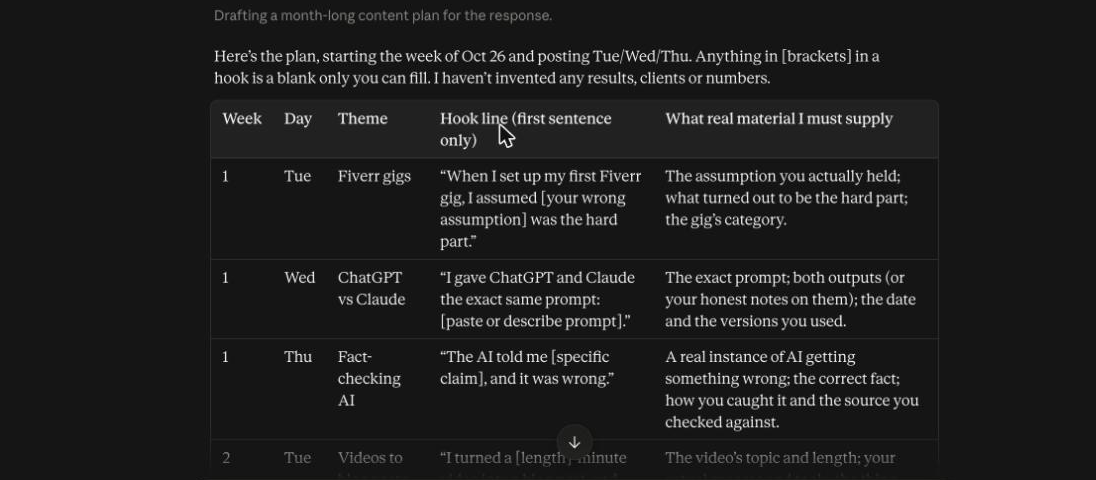
The table gave me twelve posts across four weeks, posting Tuesday, Wednesday and Thursday. Each hook had a blank where my own details go, for example "When I set up my first Fiverr gig, I assumed [your wrong assumption] was the hard part." The last column told me exactly what to supply: "the exact prompt; both outputs; the date and the versions you used."
It also followed a pattern I would not have thought of: within each theme, the first post is a story, the second is a concrete detail, and the third is a takeaway. It said it had not invented any results, clients or numbers, and the hooks bear that out.
One caution. It picked a start date by itself (the week of 26 October). Change the dates to match your own calendar.
Step 3: gather the material first
Go through the plan and fill in the last column for each post. Keep a simple note for each: what happened, what you did, what you would change. Screenshots and exact prompts are worth saving at the time, because they are hard to recreate later.
If you can't fill in the last column for a post, swap it for one you can.
Step 4: draft each post from your notes
Once you have the notes, give the AI one post at a time:
Write a LinkedIn post of about 120 words from these notes. Use only what is in the notes. First line must stand alone. No hashtags, no emojis, no ending question asking for comments. Notes: [paste]
Then edit it by hand until it sounds like you, as in the earlier post on proposals.
Step 5: schedule, and keep a spare
Post when you can reply to comments for the first hour. Keep two finished posts in reserve so a busy week doesn't break the routine.
The takeaway
A content plan from AI is only as good as the material you feed it. Use it to organise your real experience and to remind you what to gather. Don't use it to invent the experience.